
SUPPORT
Ordering, delivery, payment, refunds, account security — the common questions are all here. Can't find an answer? Contact support any time.
Getting started
What is AlborPlay?
AlborPlay is a top-up store for players worldwide: direct ID top-ups for mobile games. Every order is handled by our team, and you can follow each one on its order page.
Can I buy without an account?
Not for now. Orders are paid from your site balance, so you need an account with a verified email first (it takes about a minute). With an account you see your orders on any device, and we email you about delivery and refunds.
Why create an account?
Your orders follow you to any device; you can save your game accounts and fill them in with one tap; you can turn on two-step verification and get new-device alerts; and you can use a balance and join the partner programs.
Which languages and currencies are there?
Seven languages — Simplified Chinese, Traditional Chinese, English, Indonesian, Thai, Vietnamese and Malay — and prices in 16 currencies. Switch any time in the header or under Account › Language & currency; your choice is remembered.
Why are prices shown in my currency but charged in USD?
Prices are set and charged in USD; your bank or wallet may convert the charge at its own rate. Local amounts marked “≈” on the page are for reference, converted at automatically updated rates.
How do I reach support, and when?
Support is available 24/7 on Telegram @AlborPlay and WhatsApp +44 7591 230890, or email support@alborplay.com. For an order, include its number — it's faster. Anyone else claiming to be our support is not us.
Buying & delivery
How do I order?
Sign in → if your balance is short, top it up first (Account › My wallet › Add funds) → choose a game → pick the region and pack → enter your player ID and details → pay from your balance. Our team then tops you up, and the order shows complete when it arrives.
How long does delivery take?
Once you've paid, our team handles the order as soon as possible, and ID top-ups usually arrive quickly; at night, during game maintenance or on busy event days it can take longer. The order page shows the progress live, and we email you when it arrives or if it can't be completed.
The order says complete, but nothing in the game?
Fully close and reopen the game and check the in-game mail or purchase history — some games only refresh after signing in again. Still nothing? Tap “Report a problem” on the order page. We'll check the top-up record and, if it didn't arrive, top it up again or refund it in full.
I entered the wrong player ID or server — what now?
Please check carefully before paying. If we haven't started it yet, use “Ask to cancel” on the order page at once: an order not yet started is canceled and refunded. If it was already topped up to another existing account, games don't allow taking it back, so it can't be recovered. If the ID doesn't exist and the top-up fails, you're refunded in full to your balance automatically.
Why does the same amount have several prices?
The same item can be offered in more than one way, or as part of a promotion, so prices and delivery can differ slightly; it's the same in-game currency either way, so you can simply take the cheaper one. For games with many packs, use “Find a pack fast” and type the amount you need.
Are there limits on first top-up bonuses, weekly passes and packs?
A first top-up bonus is usually once per account; weekly or monthly passes and limited packs may have purchase limits or time windows. The game's own rules apply, and the pack card says so. If the account already used the offer, the game may credit the normal amount or refuse the purchase.
Can I buy more than one at a time?
Yes. After choosing a pack, use the quantity buttons — up to 20 in one order; first-top-up packs are limited to 1 per order.
Can I top up for a friend?
Yes. For an ID top-up, just enter your friend's player ID (and server). Double-check it with them — a top-up to the wrong account can't be recovered.
How do I check an order's progress?
Signed in, see every order and its progress under My orders; we also email you when it arrives, can't be completed or is refunded.
What do the order statuses mean?
Awaiting payment: not paid yet; canceled automatically when time runs out.
Paid · in queue: payment received; waiting for our staff to take it.
Processing: we're topping you up.
Delivered: the order is complete.
Failed · refunded: we couldn't complete it; the payment is back in your balance in full.
Canceled: the order is closed; the order details say where the refund went.
Can't find the game or pack you want?
Search for the game; if nothing comes up, tap “I want this game” — we add the most-wanted games first. If the pack you want isn't listed, let support know.
Finding your player ID
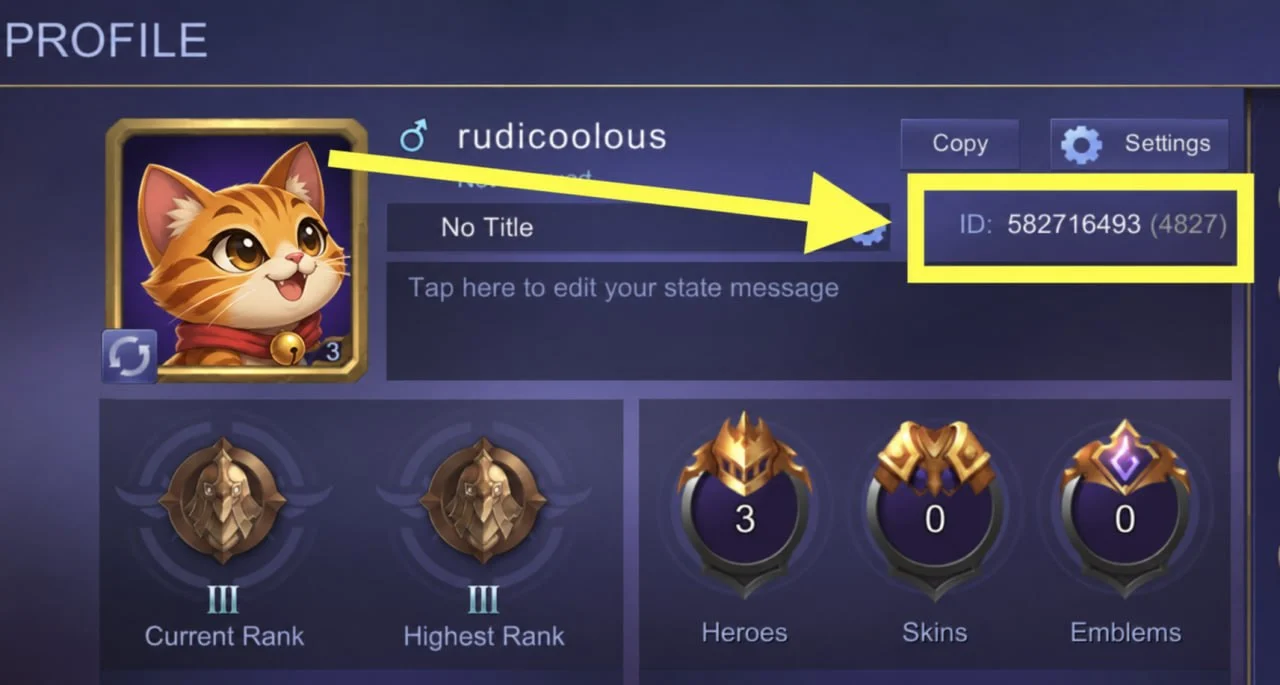
Where are my Mobile Legends User ID and Zone ID?
In the game, tap your avatar at the top left to open your profile. The number under your name is the User ID, and the number in parentheses after it is the Zone ID. Enter both.
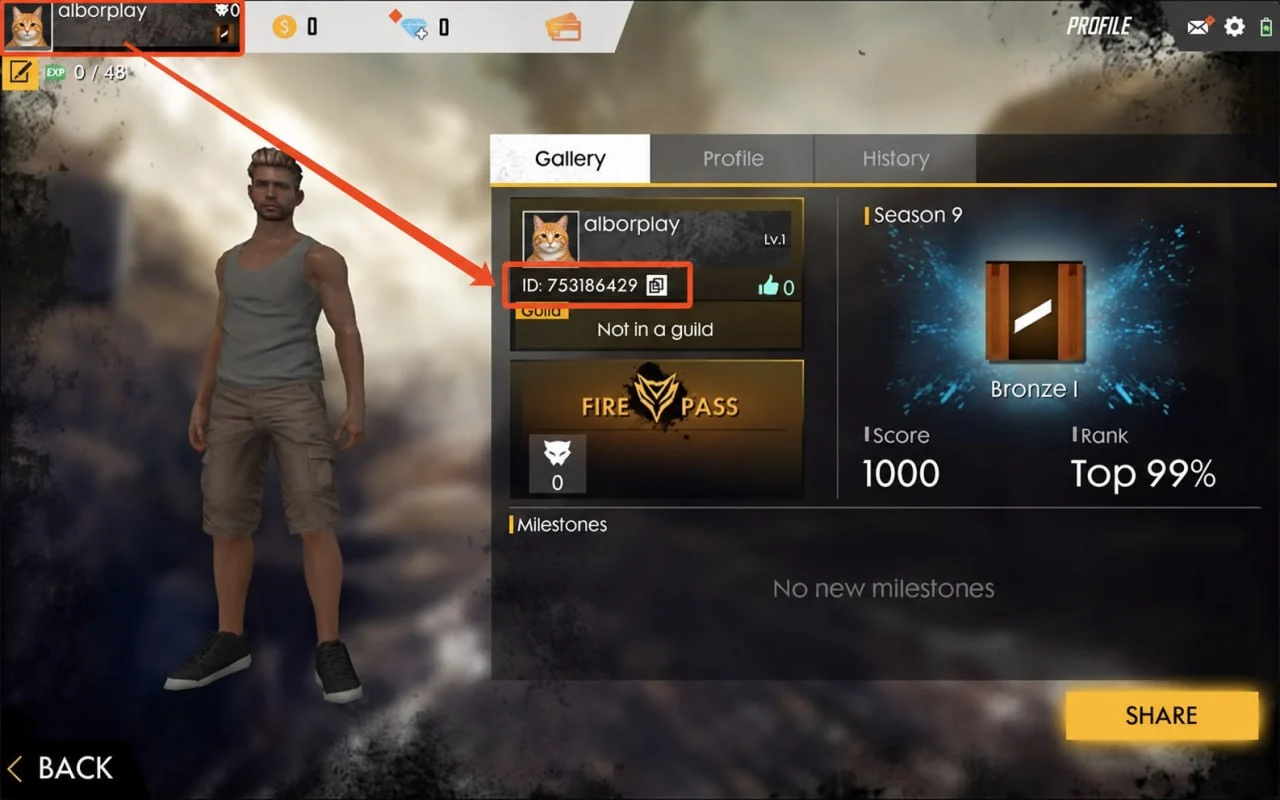
Where is my Free Fire player ID?
In the game, tap your avatar at the top left; your player ID is under your name on the profile page, and you can copy it there.
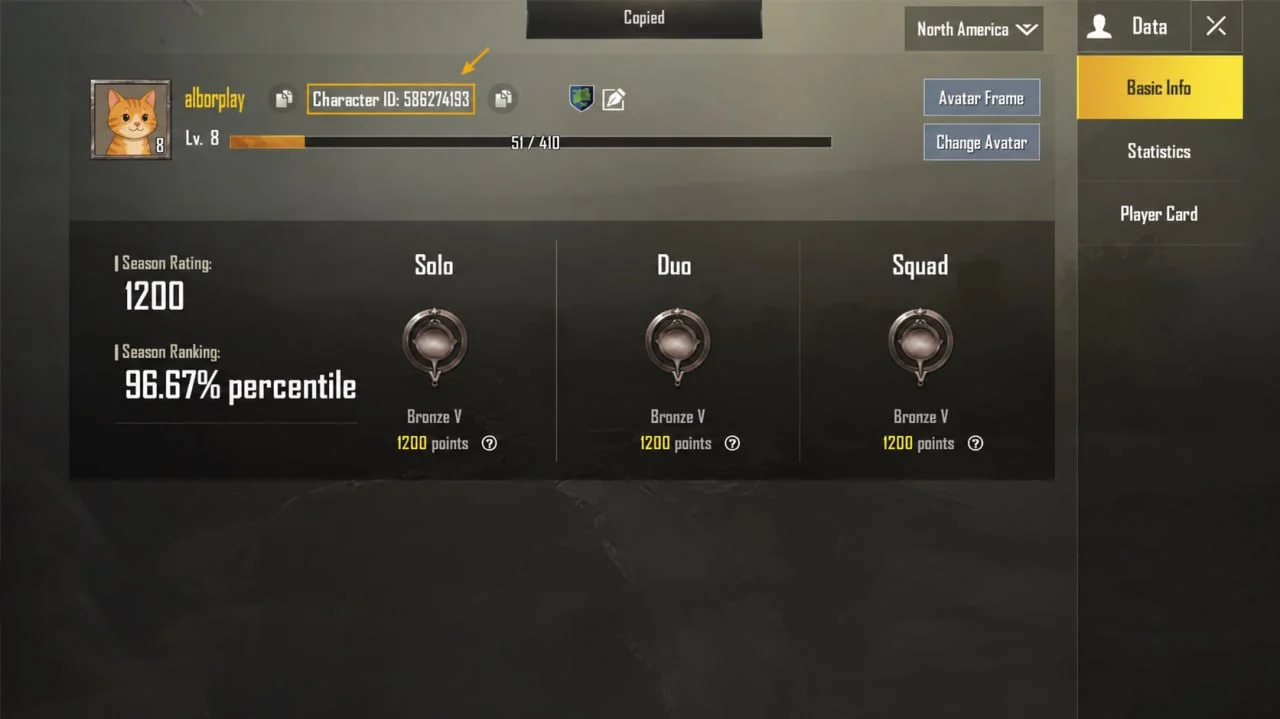
Where is my PUBG Mobile character ID?
In the game, tap your avatar to open your profile; the Character ID is the string of digits next to your name, with a copy button beside it.
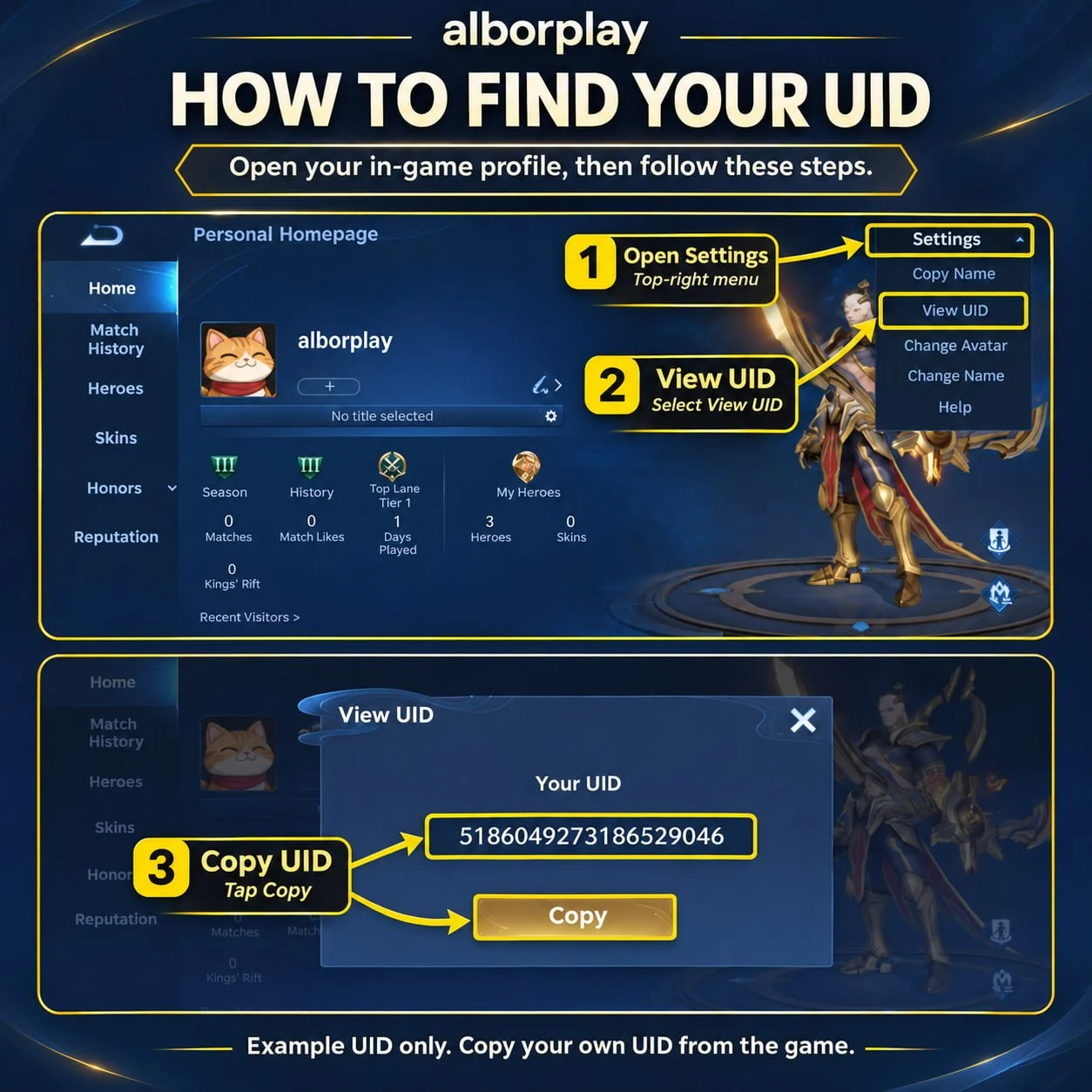
Where is my Honor of Kings ID?
In the game, tap your avatar at the top left to open your profile, then open Settings at the top right, choose View UID and tap Copy. If the product page asks for a server, choose it too.
Where is my Riot ID?
Riot games (such as Valorant and League of Legends) top up by Riot ID: your game name plus a tag, written Name#TAG, for example AlborPlay#AP7. You'll find it on your profile in the game, or in your Riot account settings. Enter all of it, the # and the tag included, exactly as shown.
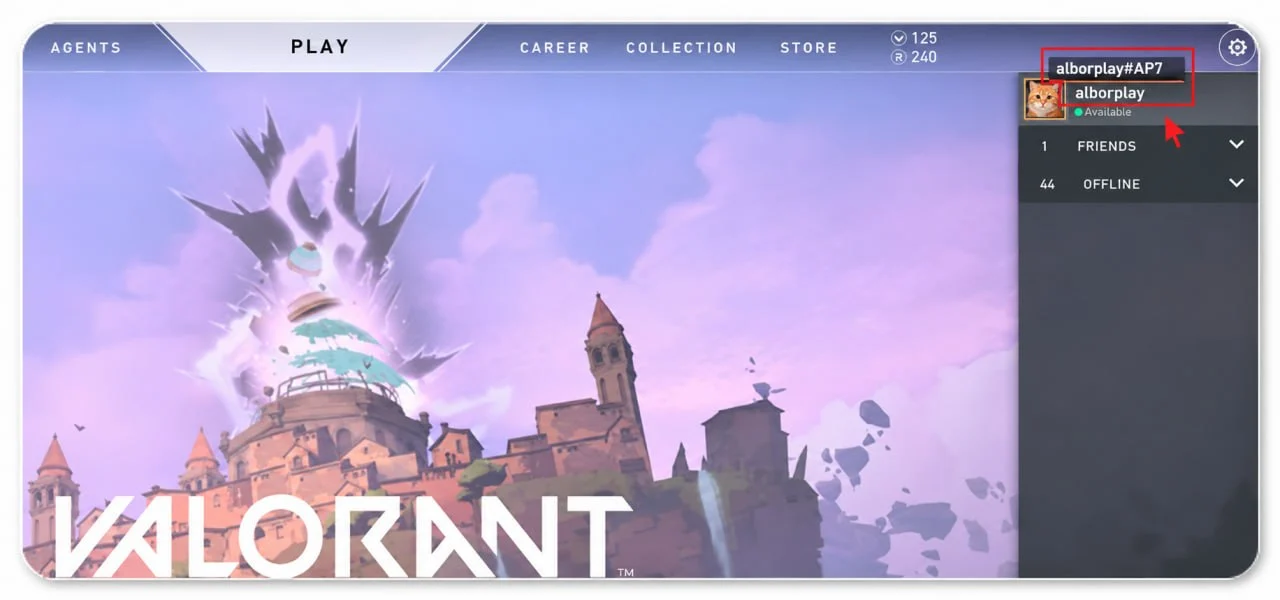
For games that need a UID and a server, where are they?
The UID is usually shown in a corner of the game screen or in your profile or settings menu; the server (e.g. Asia, Europe, America, TW/HK/MO) is the one you pick when you sign in. Both must match the game.
How do I find the ID in other games?
In most games the ID is on the profile, settings or avatar page, usually a string of digits. The product page has a hint by the field; if you can't find it, send Support a screenshot. Don't enter your nickname, and never put a password in the ID field.
Payment
Which payment methods are accepted?
Orders are paid from your site balance. To top it up, open Account › My wallet › Add funds, pay by one of the methods listed there as shown, then send a balance top-up request; we add it to your balance once we've checked the payment. Online payment is being set up; the methods will be listed there once it opens.
My payment failed — what now?
If your balance is short when you order, the page asks you to top it up first. If a balance top-up request isn't approved, the email and My balance top-ups say why; if you did pay, contact support with a screenshot of the payment.
I paid, but my balance hasn't gone up?
A balance top-up request is added to your balance once we've checked the payment, and we do that as soon as we can. Follow it under Account › My wallet › Add funds › My balance top-ups; if it stays under review for a long time, contact support with a screenshot of the payment.
If I close the page after paying, is the order still processed?
Yes. Once paid, your order is handled on our side, so closing the page or losing connection doesn't matter. You can follow it later under My orders.
Could I be charged or topped up twice?
Each order is submitted for top-up only once, and repeated payment notices never cause a second top-up. If you really paid twice for one order, the extra payment is refunded to your balance (or handled by the refund rules).
Can I pay with my balance?
Yes — for now every order is paid from your balance. Your balance comes from approved balance top-ups, order refunds and affiliate commission, and is kept in US dollars.
Refunds & after-sales
When can I get a refund?
A full refund applies when a top-up fails, never arrives, the item can't be supplied, or the order is canceled before it was submitted. A top-up that has arrived usually can't be refunded (games don't allow taking it back).
Where does a refund go, and how fast?
By default to your balance on the site: instantly, with no fee, ready for your next order. The balance is kept in US dollars and can only be spent here.
I want the refund on my original payment method.
Contact support within 30 days of the refund. The payment provider's fee (as the provider charges) is yours to bear, and it arrives as fast as the provider allows, usually in 3–10 business days.
Can a top-up that already arrived be refunded?
Once in-game currency is in an account, games don't allow taking it back, so it generally can't be refunded. If the amount received doesn't match the order, contact support and we'll check and top up the difference or refund part of it.
How do I ask for help with an order?
Open the order, tap “Report a problem”, choose the kind of problem and describe it — you can add a screenshot. The order details go to our support team automatically, so you don't have to type them again.
What should I prepare?
The order number, player ID and server, and screenshots that show the problem (for example the in-game balance, purchase history or an error message). The more complete, the faster we can help.
Sign-in & security
I forgot my password.
On the sign-in page tap “Forgot password”, enter your account email, and set a new password with the code or link in the email. For your security, our support team can't set or reset passwords.
How do I turn on two-step verification?
Go to Account › Sign-in & security › Two-step verification, scan the QR code with an authenticator app such as Google Authenticator or Microsoft Authenticator, enter the 6 digits, and keep the 10 backup codes somewhere safe.
I lost my phone and authenticator — how do I sign in?
Sign in with one of the backup codes you saved when turning it on. If you can't find those either, contact support; once we've confirmed it's you, we can turn two-step verification off, and you'll be emailed about it.
How do I change my email?
Under Account › Sign-in & security tap your email, confirm it's you, enter the new address and the code sent to it. The old address is told about the change.
How do I see signed-in devices and sign others out?
Under Account › Sign-in & security › Signed-in devices, you'll see every signed-in device and its recent activity; tap sign out to end one. If you see a device you don't know, change your password at once.
How do I delete my account, and what about my balance?
Request it at the bottom of Account › Sign-in & security; it's carried out after 7 days, and signing in or tapping Cancel deletion before then keeps your account. If there's money on your balance, contact our support team before the deletion completes to have it refunded the way you paid, less any fee the payment provider or bank actually charges; if you don't ask, the balance is given up when the deletion completes.
How do I spot someone pretending to be AlborPlay?
AlborPlay never asks for your password, codes or backup codes in a private message, and never sends “free diamonds” links. Our only support chat accounts are Telegram @AlborPlay and WhatsApp +44 7591 230890. Trust only this website's address, and check anything suspicious through the support link on the site.
Balance & partners
What is the balance, and can I withdraw it?
Your balance is money on your account here, kept in US dollars, for your orders; it comes from your top-ups, order refunds, affiliate commission and the like. It can only be spent here and can't be withdrawn or transferred to anyone.
How do I add money to my balance?
Open Account › My wallet › Add funds: pick a payment method, pay as shown, then send a request with the amount and the payment reference (a screenshot helps). We add it to your balance once we've checked the payment, and email you. Only pay the accounts shown on that page — we never send other accounts by private message.
How do I become a reseller?
Signed in, apply under Account › Partner programs with your business type, volume and so on; we usually review within 1–3 business days. Once approved, the product pages show your reseller prices whenever you're signed in.
How is affiliate commission calculated and paid?
You earn commission on the amounts paid for orders placed during the referral period by customers who signed up through your link. Refunds reduce the commission accordingly. After a hold of a few days, you can transfer it to your balance or request a PayPal payout once you reach the minimum amount. The full rules are under Account › Partner programs.
Didn't find your answer?
Support is here 24/7. For an order, include its number — it's faster.
Telegram supportWhatsApp supportsupport@alborplay.comFind my orderGuides